Sonos SIT
A generated home-audio interface that starts from what each person already knows.
- Role
- Independent concept, UX/UI and prototype
- Format
- Interactive demonstration and working interface builder
- Status
- Concept prototype, not an official Sonos product
Context
Home-audio products must support the same essential tasks for everyone: choose a room, find music, play it and adjust volume. People do not always look for those controls in the same order or expect them in the same layout.
Problem
A fixed interface asks everyone to learn one way of reaching these tasks. The question behind SIT was whether a product could generate a familiar layout for each person without rebuilding or changing the audio functions underneath.
This is a design hypothesis, not a claim about Sonos users or measured product performance.
Role
I framed the question, designed the interaction model, built the mock interface and produced the interactive comparison. This is self-initiated work; Sonos did not commission or endorse it.
Approach
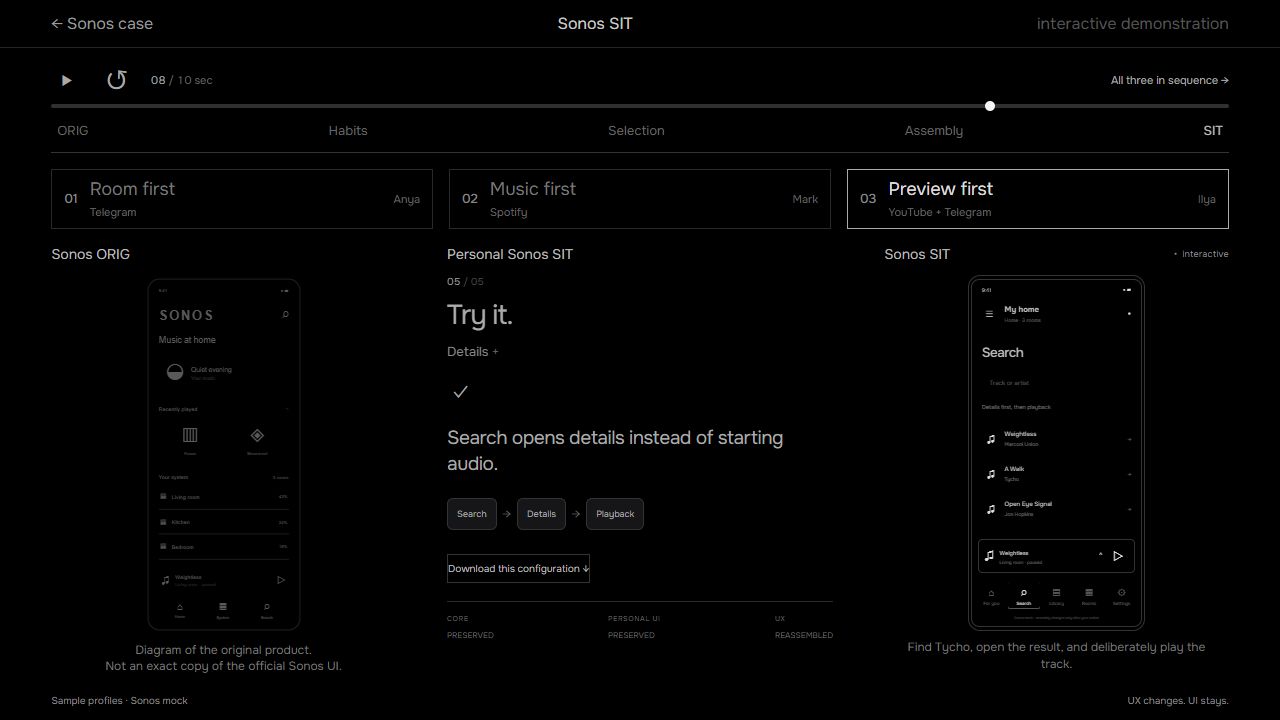
Keep one mock audio core and let people shape its presentation. In the local builder, a familiar layout or screenshot becomes a proposed interface; the person checks the suggested meaning of its controls, changes labels or placement, and saves a version. The public demo shows three example outcomes, not an automatic solution for every app.
Place
Start from the physical room, then reach playback and volume.
Content
Start from the track or playlist, then choose where it plays.
Exploration
Inspect a result before committing to playback.
Execution
The public demonstration compares three personalized layouts against the same mock audio functions. A separate local builder generates a configurable interface from a selected template or screenshot, proposes mappings between familiar controls and audio actions, and lets the person review, correct and save the result. Changes are applied only when that person confirms them.
Best viewed on a desktop screen · no account required
Outcome
The working local builder and public comparison show a practical way to personalize presentation while preserving one functional core. The next test would ask whether this helps people find and control audio faster or with less effort. That benefit has not been measured, and this is not an official Sonos product.